LinkedIn Android — UI Rendering & Overlay Bug
A mobile UI defect investigation documenting how a payment reminder banner overlapped feed content and persistent bottom navigation, with a focus on overlay behaviour, readability, and regression coverage.
Overview
While using the LinkedIn Android application, I identified a UI rendering issue involving a payment reminder banner. The message, “There was a problem processing your payment. Please update your payment method(s),” was not visually contained within its own component and instead crossed into two independent UI regions: the promoted feed content and the persistent bottom navigation bar.
This case study documents the observation from a QA perspective and focuses on how transient UI components should coexist with persistent navigation and dynamic feed content.
The Problem
The payment reminder appeared to behave like an overlay without respecting the boundaries of the underlying application layout. As a result, multiple UI layers occupied the same visual space and portions of the interface became difficult to read.
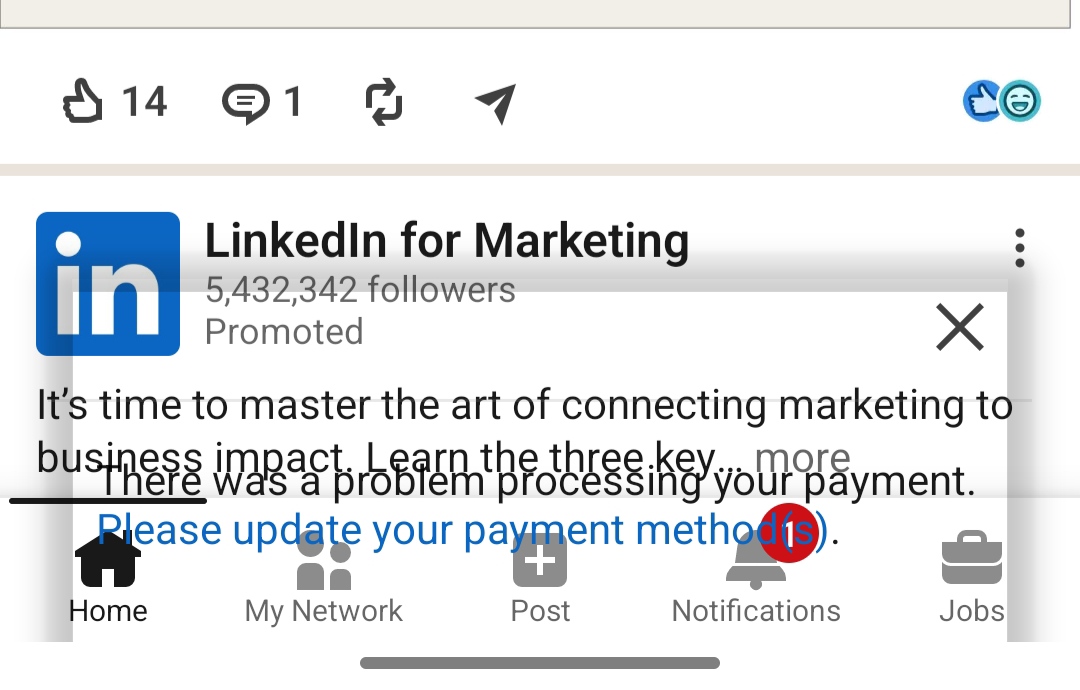
- The payment reminder overlaps content from a promoted LinkedIn Marketing post.
- The reminder extends into the bottom navigation region.
- Text and navigation elements become partially obscured.
- The notification does not appear visually separated from the surrounding interface.
Actual vs Expected Behaviour
Actual behaviour: The payment reminder is rendered across existing UI layers, partially covering feed content and the Home, My Network, Post, Notifications, and Jobs navigation area.
Expected behaviour: The payment reminder should render as a self-contained notification or transient component that respects layout boundaries, maintains adequate spacing, and does not obscure important content or persistent navigation.
User Impact
- Readability: The payment message and promoted content compete for the same visual space.
- Navigation: Persistent bottom navigation is partially obstructed by the overlay.
- Visual hierarchy: The notification is not clearly separated from the underlying feed.
- Usability: The overlap can make the interface appear visually unstable and can interfere with understanding or interacting with affected elements.
QA Analysis
From a QA perspective, this issue is relevant to transient-component and overlay testing. Notifications, banners, snackbars, and error messages should be validated in the context of the complete screen rather than only as isolated components.
The key question is not simply whether the payment reminder appears, but whether it appears correctly across different content, scroll, device, and navigation states without degrading the surrounding experience.
Suggested Test Coverage
- Display the notification over a normal feed state and verify that content remains readable.
- Display the notification near persistent bottom navigation and verify that navigation remains unobstructed.
- Test long notification text and different message lengths for clipping or overflow.
- Validate behaviour across different screen sizes and Android resolutions.
- Trigger the notification while the feed is at different scroll positions.
- Validate the interaction between the notification and promoted/sponsored content.
- Dismiss the notification and confirm that the underlying UI returns to its expected state.
- Test portrait orientation and any supported alternate orientations.
Severity Assessment
Suggested Severity: Medium. The observed issue does not appear to prevent the application from functioning, but it affects the visual integrity and usability of important interface elements. Priority may increase if the behaviour is reproducible across multiple devices, Android versions, or notification types.
Areas for Investigation
The screenshot establishes the visual defect but does not, by itself, establish the technical root cause. Areas worth investigating include overlay positioning, notification container constraints, bottom navigation safe-area/inset handling, z-index or elevation behaviour, dynamic content height, and device-specific rendering differences.
QA Recommendation
I would include overlay-component validation in regression coverage. Transient UI elements such as payment alerts, toasts, snackbars, error messages, and promotional banners should be tested against persistent components including bottom navigation, headers, floating controls, input fields, modals, and sticky elements.
This type of coverage helps catch visual regressions that traditional functional testing can miss, especially when the defect appears only when multiple independently working UI components are rendered together.
Reflection
This case reflects how I approach QA beyond simple functional validation. A feature can technically appear while still creating a poor or confusing experience when it interacts with the rest of the interface. Looking at component boundaries, visual hierarchy, edge states, and the user's ability to continue navigating is an important part of product quality.