Keka HR — Birthday Tooltip Date Formatting Bug
A QA case study documenting a date-formatting defect in the Keka HR Birthday widget, where an employee's birthday tooltip displayed an incomplete four-digit year.
Overview
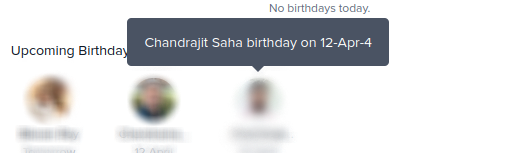
While validating the Birthday widget in Keka HR, I identified a UI data-formatting issue in the employee birthday tooltip. The tooltip displayed an incomplete year, showing only the final digit instead of the expected four-digit year.
The defect was reported as BR-002 and was subsequently fixed. This case demonstrates how a small visual/data-formatting defect can be identified through focused UI validation and translated into a precise, reproducible bug report.
The Problem
The Birthday widget correctly identified the employee and birthday date, but the tooltip's year value was truncated. This made the displayed date inconsistent with the expected date format and reduced the clarity of the information presented to the user.
Bug Details
Steps to Reproduce
- Log in to Keka HR.
- Navigate to the Birthday widget on the dashboard.
- Hover over an employee's avatar to display the birthday tooltip.
- Inspect the date displayed in the tooltip.
Actual vs Expected Behaviour
Actual behaviour: The tooltip displayed “Chandrajit Saha birthday on 12-Apr-4”, with only the last digit of the year visible.
Expected behaviour: The tooltip should display the complete date as “Chandrajit Saha birthday on 12-Apr-2026”.
Suspected Root Cause
The observed behaviour suggested that the date-formatting logic was truncating the year value instead of rendering the complete four-digit year. The exact implementation-level cause would require code-level investigation, but the UI symptom provided a clear direction for the development team to inspect the date formatting and string handling.
QA Analysis
This was a small defect with a very clear reproduction path, making it important to capture the exact expected and actual strings. Precise expected-output documentation reduces ambiguity for developers and makes fix verification straightforward.
- Validated the issue at the component level through the Birthday widget.
- Captured the exact incorrect output rather than describing it generically as a date issue.
- Documented the expected four-digit year format.
- Included module, severity, priority, environment, and reproduction steps.
Resolution
The defect was fixed. The birthday tooltip's date formatting was corrected so the year is represented as a complete four-digit value rather than a single trailing digit.
The issue was therefore closed as a resolved UI/data-formatting defect after the formatting behaviour was corrected.
Regression Coverage
For a date-formatting fix like this, regression coverage should include different calendar dates and year values to ensure the formatting logic is not dependent on a specific date.
- Verify four-digit years are displayed consistently.
- Validate birthdays across different months and days.
- Check dates across year boundaries.
- Verify the tooltip for multiple employee records.
- Confirm the corrected format remains consistent after refresh and navigation.
- Check that other date fields using the same formatting utility are unaffected.
Impact
The defect did not prevent users from accessing the Birthday widget, but it reduced the accuracy and clarity of the information displayed. A complete date is important for a workplace information system because users should be able to understand the displayed date without ambiguity.
Reflection
This case highlights the value of detailed UI validation in QA. A defect does not need to break a workflow to be worth reporting. Small inconsistencies in data presentation can affect trust in the product, and a concise reproduction path combined with an exact expected result can make such issues easy to diagnose and resolve.