EatSure — Veg Filter Displaying Non-Vegetarian Items
A QA-led investigation into incorrect dietary filtering, combining reproducible defect reporting with UX and product-quality analysis.
01 — The Observation
While using the EatSure food delivery app, I noticed an unexpected behaviour when browsing the menu with the Veg filter enabled.
Despite selecting the vegetarian filter, the menu continued displaying clearly non-vegetarian products, including chicken-based dishes.
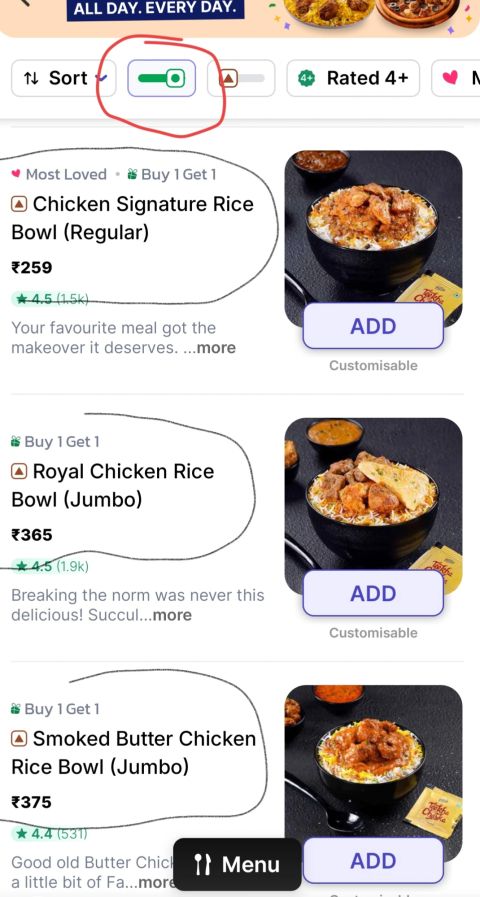
From a user perspective, this was confusing. From a QA perspective, it immediately became a reproducible defect worth documenting.
02 — The Problem
The filter created a clear expectation:
Veg selected → vegetarian products only.
Instead, non-vegetarian products remained in the resulting menu. This created a mismatch between the user's selected criteria and the data presented by the application.
03 — Reproduction Steps
- Open the EatSure food delivery application.
- Navigate to a restaurant or menu containing vegetarian and non-vegetarian products.
- Enable the Veg filter.
- Browse the resulting menu.
- Observe the products displayed after filtering.
Actual Result
Non-vegetarian products continued to appear after the Veg filter was enabled.
Expected Result
Only products classified as vegetarian should be displayed while the Veg filter is active.
04 — Why This Matters
A filter is not merely a visual control. Users rely on its output to make decisions.
For users with dietary restrictions or preferences, incorrect filtering can result in:
- Confusion about which products meet their selected criteria.
- Loss of confidence in the filtering system.
- Additional effort spent manually checking individual products.
- A mismatch between the user's intent and the experience delivered.
05 — QA Analysis
The issue sits at the intersection of functional correctness, data integrity and user experience.
The filter could appear visually active while still failing to produce the correct dataset. That distinction is important: a control being enabled does not necessarily mean its underlying behaviour is correct.
Areas I Would Investigate
- Whether affected products have incorrect vegetarian/non-vegetarian classification in the backend.
- Whether the filtering API is returning incorrect products.
- Whether the frontend is incorrectly interpreting the filter response.
- Whether cached menu data is bypassing the active filter.
- Whether the issue occurs across different restaurants and product categories.
- Whether the behaviour is consistent across app versions and devices.
06 — Test Coverage
Beyond reproducing the reported defect, I would use the issue to strengthen regression coverage for dietary filtering.
Functional
- Enable Veg filter on a mixed menu.
- Verify every returned product is vegetarian.
- Disable the filter and verify the complete menu returns according to the restaurant's catalogue.
Negative & Edge Cases
- Restaurant with both vegetarian and non-vegetarian products.
- Restaurant with only vegetarian products.
- Restaurant with no vegetarian products.
- Products whose dietary classification changes.
- Repeatedly enabling and disabling the filter.
Navigation & State
- Apply the filter and scroll through the complete menu.
- Navigate between menu categories while the filter remains active.
- Refresh the menu while the filter is enabled.
- Load additional results through pagination or infinite scroll.
Search & Regression
- Search for a product while Veg filtering is active.
- Verify newly loaded products respect the active filter.
- Repeat the same checks after a release or catalogue update.
07 — User Journey
Current observed journey: Open menu → Enable Veg → Browse results → Non-vegetarian products remain visible → User questions filter accuracy.
Expected journey: Open menu → Enable Veg → Browse results → Vegetarian products only → User can confidently continue.
The goal of the filter is not simply to change the UI state. It is to make the resulting product set trustworthy.
08 — Resolution
I documented the issue with clear reproduction steps and supporting screenshots and shared the report with the relevant team.
I later received a call informing me that the issue had been fixed.
This closed the loop from observation → defect report → team communication → resolution.
09 — QA & Product Perspective
This experience reinforced an important QA principle: functional testing and user experience are closely connected.
As a user, the behaviour was confusing. As a QA professional, the unexpected result triggered investigation. As a product-minded tester, the important question was whether the application was reliably translating user intent into the correct result set.
10 — Key Takeaway
A small observation while using a food delivery app turned into a real-world QA investigation.
It reminded me why I enjoy Quality Assurance: curiosity, attention to detail, questioning unexpected behaviour, and advocating for the user.
Finding a bug is only the beginning. Understanding its impact, communicating it clearly, and helping the product become better is where QA creates real value.
Case Study Classification
- Type: Functional / UX Defect Investigation
- Domain: Food Delivery
- Area: Menu & Filtering
- Primary Theme: Incorrect Filter Behaviour
- Secondary Themes: Data Integrity · Negative Testing · Regression · User Advocacy · Product Quality
- Status: Reported & Fixed
Note: The case study documents the observed application behaviour and the reported resolution. The underlying technical root cause was not independently verified.